
Reviewed · SEOUL
South Korea eSIM (3-30 days. Up to 45GB)
Getting online in Seoul is shockingly easy. This eSIM gets delivered to your inbox, and a QR code lets you activate the profile within minutes. I love the low-effort setup, because you skip airport SIM lines, and I like the way it’s designed to attach to the local network automatically so you can navigate without second-guessing signal.
The only catch is your phone has to support eSIM, and activation may need a quick restart if it does not go fully live right away.
Key highlights to know before you buy
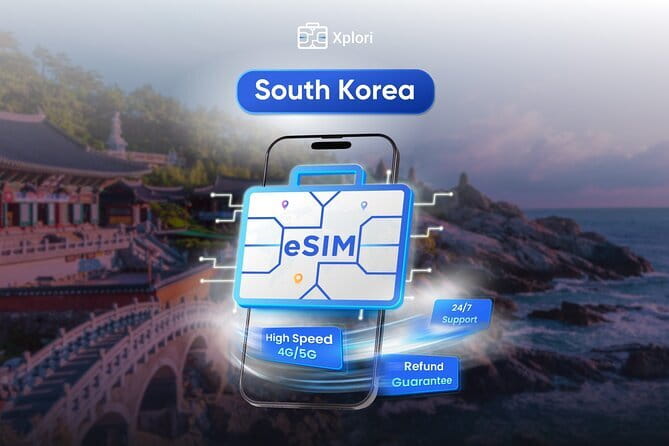
- Email delivery that you can handle before arrival so you are not stuck troubleshooting after landing
- QR activation that turns on your data fast with minimal steps
- 4G/5G where available for maps, messaging, and streaming at local rates
- Speed cap management: high-speed data ends at your included amount, then it drops to 3G
- Reliable connection patterns reported from Seoul out toward trips like Jeju
- Remote email support when you need help with activation or connectivity
What this South Korea eSIM includes, and what “up to 45GB” means
This is a South Korea mobile data eSIM from Xplori, sold for 3 to 30 days depending on the duration you select. The plan advertises up to 45GB of data, which is a big deal if you are planning your trip on your phone, using maps all day, and checking transit times without hunting for Wi-Fi.
One important detail: it is 4G/5G where available at local rates, then you hit a limit. After you use the high-speed allowance, the connection switches to 3G speed. That does not mean you lose connectivity. It means your experience shifts from fast to slower, and that matters if you expect heavy streaming every day.
Also note the plan description says it covers all Canadian provinces. Since this product is for Seoul and South Korea use, I recommend you double-check the exact coverage in your confirmation email, just to make sure you are buying what you think you are buying.
You can also read our reviews of more tours and experiences in Seoul.



Activation in real life: email delivery, QR scan, and the roaming toggle
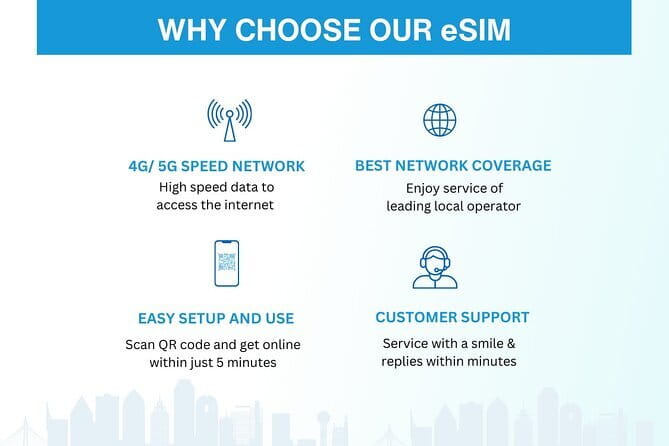
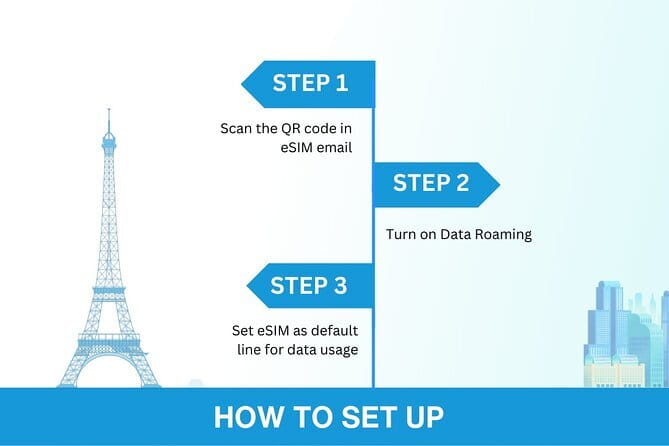
Your eSIM is delivered digitally by email. After you order, you get the eSIM info and then you scan the QR code to activate the eSIM profile. The goal is simple: be connected within minutes, without dealing with a physical SIM counter and without language barriers.
In practice, activation can still have little hiccups, especially if you are landing and juggling airport stress. A useful tip from real-world experience: you may need to turn on your data roaming when you arrive, and if it still feels stuck, a quick device restart can help the eSIM fully switch on.
Here is how I’d plan it so you do not waste time:
- Activate before or right after you land, not a week later.
- When you turn it on, give it a few minutes, not five seconds.
- If it looks connected but you cannot browse, restart the phone once and try again.
Because everything is digital, there is no pickup, no meetup, and no office wait time. You are basically doing a small setup task and then getting on with your trip.
Speeds in the real world: 4G/5G first, then 3G after your cap
The big promise is 4G/5G where available. That is what you want for everyday travel tasks: loading maps, using navigation, pulling up restaurant menus, sending messages, and even video calls.
The practical part is the speed cap. Once you use up the included high-speed data, your speed drops to 3G. If you only use your phone for navigation and messaging, 3G is often enough. If you are streaming video for hours, uploading lots of photos, or doing frequent hotspot-style use, 3G can feel slow.
A good rule: if your plan includes lots of media use, treat your included high-speed amount like a budget. Plan your heaviest data moments for times you expect strong signal and fewer network changes, like in your hotel, a café, or near your base.
The product description also emphasizes staying connected after the high-speed cap, so you should still be able to find your way and stay in touch. You just manage expectations on speed.
Where it works: Seoul, plus longer hops like Jeju
This eSIM is positioned for use in Seoul and across South Korea during your trip length. One of the most praised parts of the experience is that the connection is meant to pick the best local network automatically, and people report strong results from Seoul to trips such as Jeju.
Why that matters: in Korea, you might hop between dense cities and smaller destinations where your phone has to keep switching towers. If your data plan works smoothly across those transitions, your navigation stays consistent, and that makes sightseeing way less stressful.
If you are planning day trips, you also want stable messaging. You do not want your ride-share or transit plans to depend on Wi-Fi. With this eSIM, the expectation is that your data stays available for the duration you selected, so you can keep using your phone as your trip tool.
Using data for a smoother trip: maps, messaging, and streaming
Once your eSIM is active, it is designed to cover the day-to-day travel workflow:
- Checking transit and arrival times
- Using maps for walking routes and subway transfers
- Messaging friends and family
- Watching videos or streaming when you are on higher-speed allowance
From the feedback, connection quality held up for video calls and streaming. That is a big deal, because many travel data options feel fine for texting, then fall apart when you try to stream or call over data. Here, the intent is to support real phone use, not just a basic connection.
I also appreciate the “set it and forget it” theme. No SIM swaps. No hunting for a new card halfway through your trip. If you are the kind of person who hates extra steps, this style of plan fits your mindset.






Choosing the right duration (3-30 days) so you do not overpay or run short
The selection is straightforward: 3 to 30 days, depending on how long you are in South Korea. The catch is that the “right” choice is usually not about your calendar, it’s about how you use your phone.
If you have a short visit and you plan light data use, the shortest option is usually the best value. If you are there longer, especially if you rely heavily on maps, planning apps, and media, the longer duration can prevent you from running out and scrambling for an alternate plan.
Here’s how I’d decide in a few minutes:
- Heavy map use + frequent ride checks + online planning every day: lean toward longer duration.
- Mostly Wi-Fi + occasional browsing: shorter duration can be enough.
- Video calls, frequent streaming, and uploading lots of photos: treat high-speed data as your main constraint, then choose a plan duration that matches your days.
Remember, even with a good duration, you still have the speed cap. So plan around the high-speed portion, not just the day count.
Value and price: why $5 can be a smart move (if it matches your phone)
The listed price is $5.00 per person. Even if that sounds almost too low for international connectivity, the value here comes from the fact that you avoid airport hassles and save time. Buying at an airport can be slower, sometimes more expensive, and you are usually tired after travel.
This eSIM also cuts down on waste. One review specifically called out the plastic-reduction angle, and it makes sense: no physical SIM card, no card replacement, less packaging.
The “gotcha” is not the price. The gotcha is making sure your phone supports eSIM and you can activate it correctly when you need it. If your phone is incompatible, the low price becomes irrelevant. That is why phone compatibility is the make-or-break detail.
Phone compatibility: check now so you do not stress later

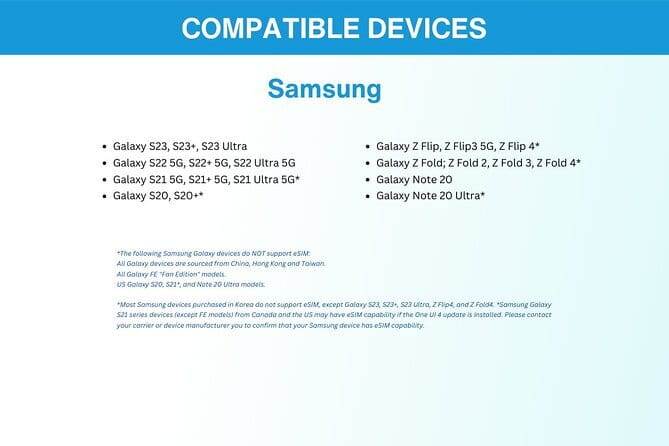
Before you buy, confirm your phone supports eSIM. The product notes eSIM compatibility examples including:
- iPhone XS and later
- Pixel 3 and later
- Samsung S20, S21, Fold
If your model is older, or you are not sure, contact the provider in advance. The product instructions explicitly encourage reaching out if you are uncertain, which is smart.
If you do have eSIM support, setup is usually fast. Still, keep a few minutes of calm for activation on day one. A quick restart can solve cases where it does not fully activate on the first try.
Customer service: remote email support for setup issues
This plan includes remote customer service by email. That matters because with eSIMs, issues are usually not about coverage. They are about activation steps, settings, or the phone not flipping the data profile cleanly.
If you hit a problem, you are not stuck guessing in a foreign airport. You have a direct support path. I like that the product includes this clearly, because it reduces the risk of buying something you cannot activate instantly.
Practical tips to use it smoothly in Seoul
A few small habits make a big difference with any eSIM:
- Turn on the eSIM profile and then check that mobile data is enabled.
- If you land and it is not browsing, enable what the phone calls the roaming data toggle, then restart if needed.
- Keep your activation info saved in email in case you need it later.
- Use Wi-Fi for big downloads only if you do not want to spend high-speed allowance early.
Also, treat your phone settings like part of the trip gear. If your data behaves strangely, restart first, then recheck data settings. This exact pattern has helped in the past.
Should you book this South Korea eSIM?
Book it if you want an easy, digital way to get data in Seoul and beyond, and you have an eSIM-compatible phone. The fast email delivery, QR activation, and reliable connection reports make it a strong pick for navigation-heavy trips and staying in touch without hunting for Wi-Fi.
Skip it if you are not confident your device supports eSIM, or if you want a “no setup at all” solution. You need to scan, activate, and likely toggle roaming or restart once. Once you are past that, though, the whole point is simple travel freedom.
One last note on risk: the purchase includes free cancellation with a full refund if you cancel at least 24 hours before the experience start time. So if your plans are in flux, you do have some breathing room.
FAQ
How long is the South Korea eSIM valid?
You can choose a plan for 3 to 30 days depending on how long your trip is.
What is the maximum data included?
The plan is listed as up to 45GB of mobile data for the selected duration.
How do I receive the eSIM?
You get the eSIM delivered by email after you order.
How do I activate the eSIM?
Scan the QR code from your eSIM details to activate the eSIM profile, then you should be connected within minutes.
Do I need a specific phone to use an eSIM?
Yes. The product states your phone must support eSIM, with examples like iPhone XS and later, Pixel 3 and later, and Samsung S20, S21, Fold.
Will my speed drop after I use the high-speed data?
Yes. High-speed data is capped at the included amount, and after that your speed switches to 3G.
Does it include customer service?
Yes. It includes remote customer service via email.
Where will the eSIM work?
The product is for Seoul, South Korea. The description also says the data plan covers all Canadian provinces, so you should check your confirmation details to confirm the exact coverage.
Is there a meeting point or pickup?
No. This is a purely digital product, so there is no pickup or meetup.
Can I cancel for free?
Yes. You can cancel up to 24 hours in advance for a full refund.


